

XLSTAT: Advanced Excel Data Analysis Tool
The software is a powerful data analysis and statistics add-in designed for Microsoft Excel, enabling users to extend the platform’s analytical capabilities. It is particularly useful for professionals and researchers who require robust statistical tools within a familiar spreadsheet environment. XLSTAT (Win) addresses the limitations of native Excel functions by offering advanced techniques in regression, multivariate analysis, clustering, and hypothesis testing.
The software supports users across various fields, including market research, quality control, biology, and social sciences. It is widely used in regions such as Indonesia, India, and the Islamic Republic of Iran, indicating strong international adoption. The tool is especially beneficial for those who need to perform complex data modeling without leaving Excel.
Its integration with the spreadsheet interface allows for seamless data import, visualization, and report generation. The developer, Addinsoft, has positioned the software as a reliable companion for data-driven decision-making in academic and professional settings.
Key Features & Capabilities
- Advanced Statistical Analysis – Offers a comprehensive suite of statistical methods, including ANOVA, regression, factor analysis, and principal component analysis, enabling users to derive deeper insights from data sets.
- Machine Learning Integration – Includes tools for classification, clustering, and predictive modeling, allowing users to apply modern data science techniques directly within Excel.
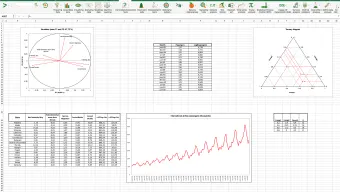
- Visual Data Representation – Provides high-quality charts, graphs, and dashboards to help users interpret complex results and communicate findings effectively.
- Batch Processing and Automation – Supports the execution of multiple analyses in sequence, improving efficiency for repetitive tasks and large-scale data workflows.
- Multi-language Support – Available in English, Spanish, and German, enhancing accessibility for international users across diverse regions.
These features are particularly valuable in real-world scenarios such as analyzing customer behavior, validating scientific hypotheses, or monitoring production quality. By embedding advanced analytics into Excel, XLSTAT reduces the learning curve associated with standalone statistical software. Users can import data from various sources, apply models, and generate reports with minimal effort. The integration with Excel’s existing tools ensures that workflows remain consistent and intuitive.
User Interface, Workflow & Performance
The user interface of XLSTAT is designed to integrate seamlessly with Microsoft Excel, maintaining a consistent look and feel across both platforms. Navigation is straightforward, with a dedicated ribbon tab that provides access to all analytical tools. The workflow follows a logical sequence: data import, method selection, parameter configuration, and result visualization.
This structure supports both novice and experienced users in executing complex analyses step by step. The software operates as an add-in, meaning it runs within Excel’s environment without requiring a separate application window. Performance is expected to be stable for typical data sizes, though exact resource usage details were not specified.
The developer did not provide additional system requirements, so users should ensure their system meets standard Excel performance benchmarks. Stability appears consistent with long-term usage, as the software has been available since 2006 and continues to be downloaded regularly. General software behavior patterns suggest efficient CPU and RAM handling during routine operations.
Compatibility & System Requirements
XLSTAT is compatible with Windows and Mac operating systems, making it accessible to a broad user base. The software version is 2016.3, and the latest update was released on March 6, 2016. The installation size is 24.4 MB, which is notably smaller than the average program in the Business software category.
This compact footprint makes it suitable for systems with limited storage space. The software supports Windows Vista and earlier versions, indicating broad backward compatibility. However, exact system requirements were not listed, so users should verify that their system meets the minimum specifications for running Microsoft Excel effectively.
Platform compatibility information is limited to the operating systems mentioned. No specific hardware requirements were provided, so users are advised to ensure their machine can support Excel’s standard operations. The software is designed to function as an add-in, meaning it relies on Excel’s underlying architecture for execution.
Pros and Cons
Pros
- Extends Excel with advanced statistical and machine learning tools
- Intuitive interface integrated into the Excel ribbon
- Supports multiple languages, including English, Spanish, and German
- Compact installation size of 24.4 MB
- Available as a free trial version with full functionality
Cons
- Latest update was in 2016, raising concerns about long-term support
- No official information on compatibility with newer Windows or Mac versions
- Resource usage details were not specified
- Free version may have limited functionality or time constraints
FAQ Section
Is XLSTAT compatible with the latest versions of Windows and Mac?
XLSTAT supports Windows Vista and earlier versions, and is also available for Mac. However, compatibility with newer operating systems was not confirmed by the developer.
Is XLSTAT safe to download and use?
XLSTAT is a legitimate software tool developed by Addinsoft. It has been downloaded over 38,000 times since 2006 and is available through trusted software distribution channels.
Does XLSTAT require an internet connection to function?
XLSTAT operates as a desktop add-in and does not require an ongoing internet connection after installation. However, updates or activation may need online access.
What type of license does XLSTAT use?
XLSTAT is available as a free trial version. The exact license terms were not provided, but it is intended for evaluation purposes.
Can I use XLSTAT offline after installation?
Yes, once installed, XLSTAT can be used offline. The software functions independently of an internet connection during analysis sessions.
Final Thoughts + CTA
XLSTAT remains a valuable tool for users seeking to enhance Microsoft Excel with advanced data analysis capabilities. Its integration with a widely used platform makes it accessible to professionals across diverse industries. While the software has not seen updates since 2016, its core functionality continues to serve users in research, quality control, and business analytics.
The compact size and multi-language support further enhance its appeal. However, users should consider the lack of recent updates and potential compatibility issues with modern systems. For those needing a reliable, free Excel add-in for statistical analysis, XLSTAT offers a solid foundation.
Download XLSTAT now and elevate your data analysis workflow with powerful tools inside Excel.







